If you have already created an OOCL account or upgraded your My OOCL Centre (MOC) account, you don’t need to create a separate FreightSmart account to quote and book with us. You can sign in directly with the following procedures:
You can retrieve your registered company records and verification status on the Company Information page . Once your company verification has been submitted, records cannot be changed.
If you need to update any of the following records, please contact our customer support team.
Additional verification documents may be required to process the update.
FreightSmart supports multiple users registered with the same company, allowing collaborative management of quotations and bookings. To register a new account to your company:
Register a new FreightSmart account
In the company verification stage of account registration, choose to associate the new account with your existing company ID. How do I find my company ID?
Approve the new user’s association request
The primary user should proceed to the User Management page
to approve the request.
Review permission settings
On the same page, primary user will have control over each sub-user’s permission such as:
| Each verified company support up to 51 sub-users. To add more, contact our customer service team. |
To recover your FreightSmart account, please contact our customer service team. Supporting documents may be required to confirm your identity.
You may reset your password by the following steps:
| If you are unable to receive the password reset email after 5 minutes, please contact our customer service team. |
To book a door-to-door or door service for either the outbound or inbound leg of an E-Spot quotation, follow these steps to provide inland locations as the origin and destination:

|
Booking Reefer or Non-Operating Reefer Cargo?
Please download our user guide for step-by-step instructions. |
E-Spot is one of the online ocean freight booking channel offered by OOCL. When you book with E-Spot, your booking is confirmed with reserved shipping space for the specified sailing and fixed ocean freight rate and surcharges, reducing the risk of your freight being rolled over and securing your logistic costs.
Additionally, you will have the following benefits of booking with E-Spot:
E-Spot will identify all viable routes of your desired origin and destination from different ports of the same country. To refine your results, you can enter a specific port of loading, transsphipment and discharge into the corresponding fields under Advanced Criteria.

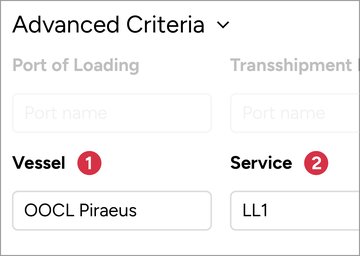
To specify a vessel, you can use the Advanced Criteria to:
❶ Vessel: Enter a keyword for your preferred vessel, such as “OOCL Piraeus”.
❷ Service: Choose from a dropdown of available OOCL service routes.
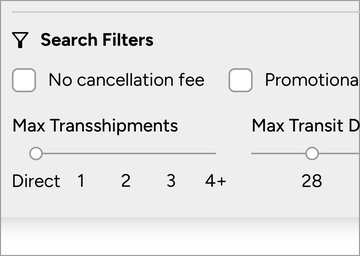
To refine your results, you can use Search Filter to display:
You can also use Sorting to find results by the Earliest Departure, Earliest Arrival or Shortest Transit Time.

When booking with E-Spot, not all container types may be available for a particular sailing. Here is what you might see and what it means:
Unavailable Container Types
If a container type is not currently on the shelf, its rate will be displayed as a long dash “——”.
Sold Out Container Types
Rates displayed as asterisks “***” indicate that the container type was once available but is now sold out.
| For sailing where all container types are sold out, you can subscribe to Restock Notices to receive email notifications if new spaces become available. |
E-Spot opens bookings for OOCL sailings up to 8 weeks in advance, though actual availability may vary. Here are some reasons why an OOCL sailing on E-Spot might be unavailable for booking:
Spaces Not Yet Open for Booking
Although the sailing is listed on E-Spot, the spaces are not yet available for booking.
Part of Container Types Sold Out
If you encounter a prompt message to adjust your search criteria, it means we cannot offer all of your requested container quantities or types. You may need to reduce the container quantity or switch to a different type of container. Ocean rates for all container types will still be displayed to maximise rate transparency.
Spaces Currently Sold Out
If you see all freight rates displayed as dashes “—”, the sailing is currently sold out.
Purchase Limit Exceeded
During peak seasons, we will implement purchasing limitations to each trade lane and different PlumSmart tier customers to ensure everyone has a fair chance to book with E-Spot. If this affects you, you’ll see a prompt with your specific limit and the reset date, if applicable.
| You can subscribe to Restock Notices to receive email notifications if new spaces become available. |
FreightSmart E-Spot coupons are the exclusive benefit to offset the ocean freight of specific routes. You can find these in Coupon & Promo Code on your account page.
Applicable coupons will appear on the Details & Payment Methods page for the E-Spot product you order.
To redeem your promo code, follow these steps:
To apply a promo code to your E-Spot Order, follow these steps:
If you receive an error message when trying to redeem or apply a promo code, or if the promo code cannot be found on the Details & Payment Methods page, please check the following:
Booking Template in E-Spot allows you to save and quickly apply frequently used booking information when submitting a booking.
Create or Edit Saved Booking Templates
Apply Booking Templates
| You can further save individual contact information and apply it to different shipping contact fields. |
Once you have submitted an E-Spot booking, you can go to Control Tower to check and manage your bookings for the following actions:
Track Your Shipment
When your cargo is being shipped, you can track its location and status on the Cargo Tracking+ page.
Purchase Extra Free Time
You have the option to purchase extra free time for the origin and destination ports if needed.
Unfortunately, we cannot combine or split your E-Spot orders or bookings.
However, when creating a booking, you may create multiple bookings with a single order. For example, if you have created an order for 10 × 40GP containers, you can create two bookings of 5 × 40GP containers each.
You will enjoy benefits like increased purchasing limits, ocean freight discounts, and cancellation fee discounts.
Explore Benefits with Each Loyalty Tier
You can check your loyalty tier by logging in to your FreightSmart account and access .
In order to retain membership of your existing tier, or move to a higher tier, members must meet certain requirements in respect of quarterly accumulated points. The new loyalty tier will be reflected in your FreightSmart account at the beginning of January, April, July, and October. The PlumSmart membership level will be assessed and updated quarterly.
Check My PlumSmart Loyalty Tier
You can recharge your E-Wallet in the Top Up page in Account Settings by either of the following methods:
| The E-Wallet only can be topped up by a mainland Chinese individual or corporate account holder. |
| No invoice will be issued for top-up transactions. Invoices will be issued based on the actual settlements. |
| You can grant permission to pay with or top up E-Wallet for your sub-users in Manage Sub-users page. |
E-Wallet is a prepayment account that allows customers to settle E-Spot surcharges when an order is created and before submitting a booking. It is currently available for companies registered in Mainland China and for settling local surcharges in Mainland China.
FreightSmart will occasionally send you exclusive discount information and direct messages by email and account messages. You can opt out from these promotional messages by the following steps:
| You cannot unsubscribe from system messages as they are crucial to your bookings or account. |
| You can turn off push notifications for the FreightSmart WeChat Mini Programme in your WeChat settings. |
You can manage permissions or transfer main user ownership to another user in your company through the Sub-user Settings page in Account Settings. To transfer ownership:
Yes, you can cancel the E-Customs Solution before submitting the first booking. Here is how to do that:
After you cancel your subscription and if you change your mind, you will still be able to book Customs Brokerage through “Explore OOCL Logistics Services” as a separate request to OOCL Logistics on the Booking tab in Control Tower.
No, charges for E-Customs Solution are processed by OOCL Logistics.
OOCL Green and Concierge Service can be purchased only under the “Additional Services” page when creating an order. Once the order is submitted, the service cannot be modified or cancelled separately. If you would like to cancel OOCL Green or Concierge Service, you will need to cancel the order and re-submit a new one.
OOCL Green applies to all containers in the order. Any adjustment of the container quantity will also affect the application of OOCL Green. If you would like to apply OOCL Green for specific containers only, please consider splitting your E-Spot orders by cancelling and re-placing a new order.
The price for OOCL Green is primarily determined by the cost of fuel and estimated emissions. Fuel costs can be influenced by market prices and vessel consumption rates, while emissions are calculated based on the distance travelled. Longer routes typically lead to higher emissions, which in turn affects the overall price. This approach ensures our pricing reflects both operational costs and environmental impact.
The emission reduction on your Green Certificate reflects the estimation based on the service route with the lowest emissions at the time of issuance, while My OOCL Centre (MOC) shows real-time estimates based on actual shipments, which may differ. Rest assured, OOCL Green charges are fixed upon order confirmation based on the emission estimation of the lowest emission route, adhering to the same calculation logic and ensuring you only pay for what you receive on your Certificate.
For E-Quote,
The genereted rate sheets are in Excel file format. If you can’t find it in your mailbox, you can visit the same page to manually download the files.
For Secured E-Quote,
The generated quotations are in PDF format.
|
Alternatively, you can subscribe to E-Quote Rate Sheet Update Alert to have updates automatically delivered to your mailbox. To do this, select the trade lanes you wish to subscribe to in Rate Sheet Delivery page and click Save under the Manage E-Quote tab.
|